
How to Optimize Your Site’s Google Crawl Budget
If you run a website, you’ve probably wondered: how can I make sure Google indexes all my important pages quickly and efficiently? The answer lies in something called Google’s Crawl Budget. In simple terms, crawl budget is the number of pages Googlebot can crawl on your site within a specific period. Optimizing your crawl budget ensures that your important pages get indexed faster, while less important or error-prone pages don’t waste valuable crawling resources.
In this article, we’ll walk you through practical strategies and actionable tips to help you increase your Google Crawl Budget and make sure your site’s content is always fresh, discoverable, and ranking well.
Smart AI-powered tools to grow your traffic faster
Why Is Crawl Budget Important for SEO?
Your crawl budget directly affects how efficiently Googlebot can discover and index your website’s pages. If Googlebot can’t crawl your site effectively, important pages might take longer to appear in search results or might never get indexed at all.
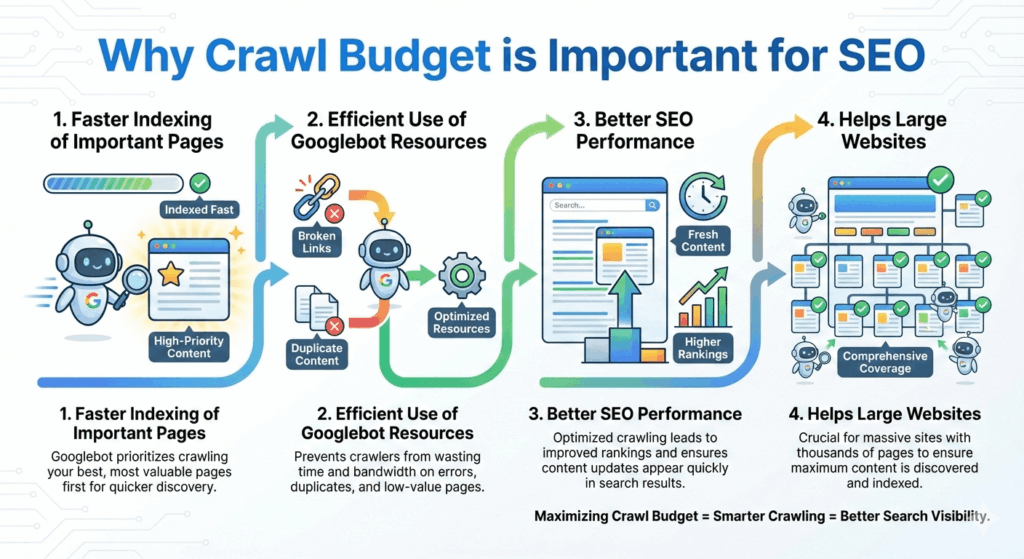
Here’s why crawl budget matters:
Faster Indexing of Important Pages
When your crawl budget is optimized, Googlebot prioritizes your most valuable content. This means new pages, updates, or key product pages get indexed faster, helping you appear in search results sooner.
Efficient Use of Googlebot Resources
Google allocates a finite amount of crawling resources to each site. If your site has broken links, duplicate content, or unnecessary pages, Googlebot wastes time crawling those instead of focusing on the pages that matter.
Better SEO Performance
Pages that are crawled more frequently are more likely to reflect updates in search results quickly. Optimizing your crawl budget ensures that your SEO efforts, such as new content or on-page optimizations, are noticed by Google faster.
Helps Large Websites
For sites with thousands of pages, crawl budget becomes crucial. Without proper optimization, Googlebot may ignore low priority pages, which can hurt visibility and rankings for less prominent content.
In short: a well managed crawl budget ensures that Googlebot spends its time wisely, indexing what matters most and boosting your overall SEO performance.
How Does Google Determine Crawl Budget?
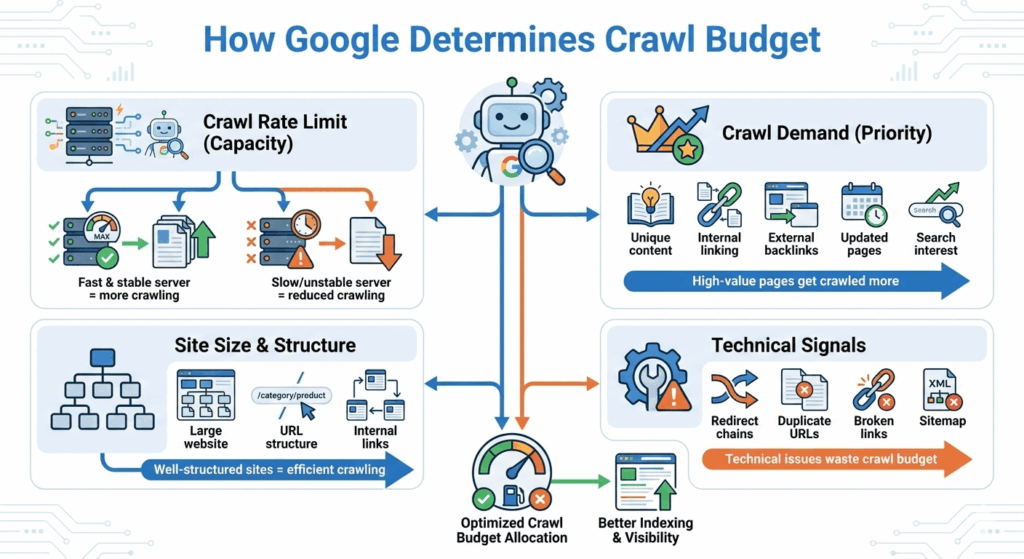
Google doesn’t assign crawl budget randomly. Instead, it’s determined by a combination of how much your site can handle and how valuable Google thinks your pages are. In general, crawl budget is influenced by two main factors:
Crawl Rate Limit (How Much Google Can Crawl)
- This is about capacity. Google adjusts how fast it crawls your site based on your server’s performance.
- If your server responds quickly and consistently, Googlebot can crawl more pages.
- If your site is slow, unstable, or frequently returns errors, Google will slow down crawling to avoid overloading your server.
- Server response time, timeouts, and 5xx errors directly affect this limit.
- In short, a healthy and fast website allows Google to crawl more pages.
Identifying and managing orphan pages is crucial for improving your website’s SEO performance. Orphan pages are pages that have no internal links pointing to them, making it difficult for Google and users to discover them. By regularly auditing your site and implementing proper internal linking strategies, you can ensure that all important pages are accessible, improving crawl efficiency, boosting indexation, and enhancing overall search visibility. Learn more about Identifying and Managing Orphan Pages for Better SEO to optimize your site structure effectively.
Crawl Demand (How Much Google Wants to Crawl)
This is about priority and importance. Google focuses its crawling efforts on pages it believes are worth revisiting.
Crawl demand increases when:
- Pages have high-quality, unique content
- Pages receive strong internal linking
- URLs get external backlinks
- Content is updated frequently
- Pages receive consistent search interest
On the other hand, low-value pages, duplicates, and outdated content reduce crawl demand.
Site Size and Structure
Larger websites naturally require more crawl budget, but only if they’re well-structured.
- Clean URL structures help Google discover pages efficiently
- Proper internal linking signals which pages matter most
- Poor architecture can cause Googlebot to waste crawl budget on unimportant URLs
Technical Signals
Several technical elements also influence crawl budget:
- Redirect chains and loops
- Duplicate URLs and parameters
- Broken links and crawl traps
- Sitemap quality and accuracy
These issues can waste crawl budget and prevent important pages from being crawled.
Crawl Capacity Limit
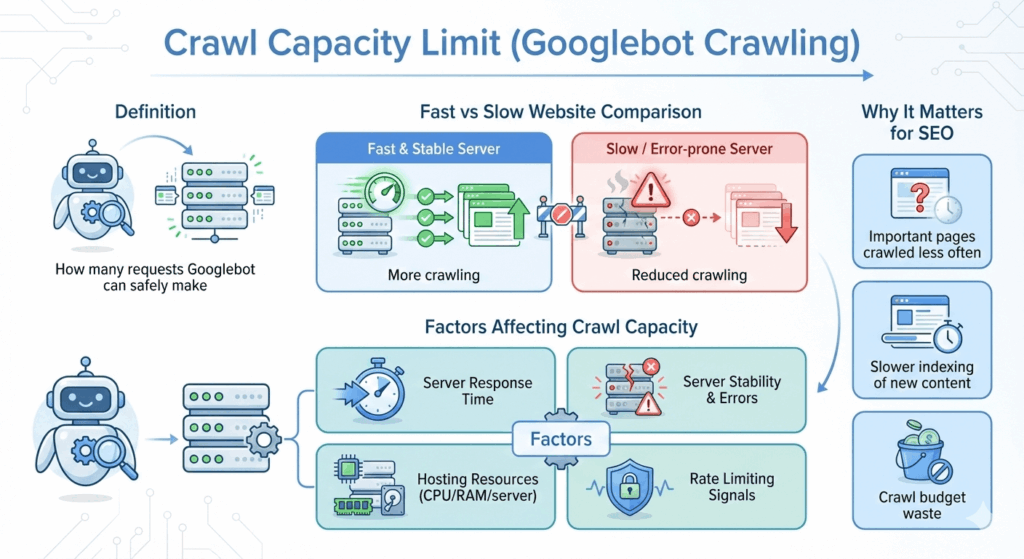
Crawl Capacity Limit refers to how many requests Googlebot can make to your website without overloading your server. Google is very careful not to harm site performance, so it continuously adjusts its crawl rate based on how well your site responds.
If your website is fast and stable, Googlebot can safely crawl more pages. If your site slows down or starts returning errors, Google automatically reduces crawling.
What Affects Crawl Capacity Limit?
Server Response Time
Faster servers allow Googlebot to crawl more URLs in a shorter period. Slow response times signal Google to crawl less.
Server Stability and Errors
Frequent 5xx errors, timeouts, or downtime cause Google to lower crawl activity to protect your server.
Hosting Quality and Resources
Websites on reliable hosting with enough CPU, RAM, and bandwidth usually support higher crawl capacity.
Rate Limiting Signals
If your server actively blocks or limits bots, Google will respect those signals and reduce crawling.
Why Crawl Capacity Limit Matters
When your crawl capacity is low:
- Important pages may be crawled less often
- New or updated content can take longer to get indexed
- Crawl budget may be wasted on fewer pages
How to Check Your Crawl Activity
To understand how Google is crawling your website, you need to look at real crawl data, not assumptions. The best way to do this is through Google Search Console, along with a few supporting tools.
Use Google Search Console (Primary Source)
Google Search Console provides the most accurate crawl data directly from Google.
- Go to Settings → Crawl stats
- Review the total number of crawl requests
- Check response status codes (200, 301, 404, 5xx)
- Monitor crawl activity by file type (HTML, images, CSS, JS)
This report helps you see whether Googlebot is spending its crawl budget on important pages or wasting it on errors and low-value URLs.
Analyze Crawl Frequency and Trends
Look for patterns over time:
- Sudden drops may indicate server issues or blocking
- Spikes could mean site changes, migrations, or technical errors
- Consistent growth usually signals better crawl efficiency
- Tracking trends helps you understand how site changes impact crawling.
Identify Crawl Waste
Use the crawl stats report to spot:
- URLs with parameters
- Duplicate pages
- Redirect chains
- Soft 404s and broken URLs
These issues consume crawl budget without adding SEO value.
Use Server Log Files (Advanced)
For deeper insights, analyze server log files:
- See exactly which URLs Googlebot visits
- Identify crawl frequency per page
- Detect crawl traps and repeated low-value URLs
- Log file analysis is especially useful for large websites.
Combine with SEO Crawlers
Tools like Screaming Frog or Sitebulb can simulate crawls and highlight:
- Internal linking issues
- Orphan pages
- Redirect problems
- Indexability gaps
7 Tips for Crawl Budget Optimization
Optimizing your crawl budget ensures that Googlebot focuses on the pages that matter most, while avoiding wasted resources on low-value URLs. Here are 7 actionable tips to improve your crawl efficiency:
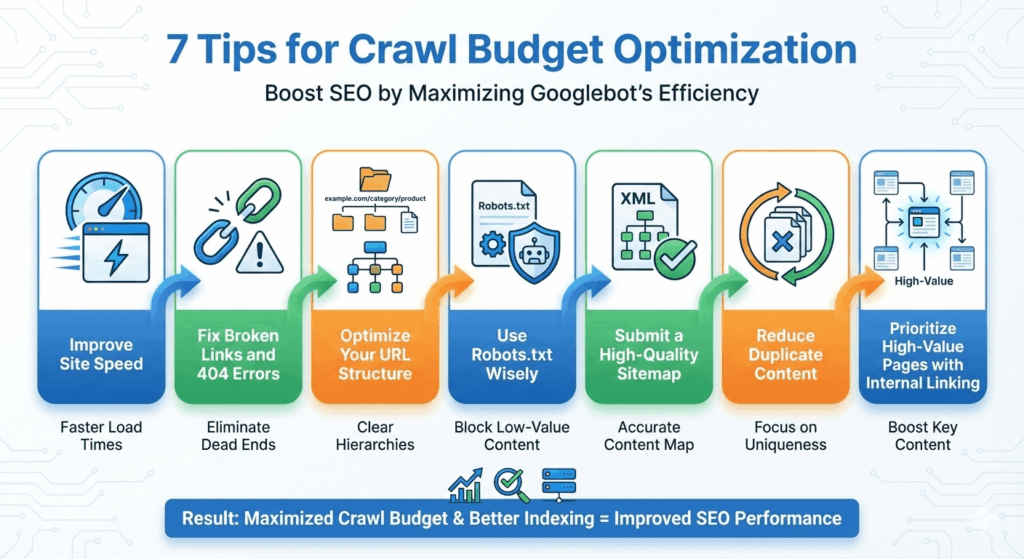
Improve Site Speed
A fast and responsive website allows Googlebot to crawl more pages in less time. Optimize images, leverage caching, and minimize server response times to increase crawl capacity.
Fix Broken Links and 404 Errors
Pages that return errors waste crawl budget. Regularly audit your site to fix broken links and remove unnecessary 404 pages.
Optimize Your URL Structure
Use a clean and logical URL structure to help Google discover important pages easily. Avoid long, complicated URLs with unnecessary parameters.
Use Robots.txt Wisely
Block crawling of low-value or duplicate pages through your robots.txt file. This prevents Google from wasting crawl budget on pages that don’t need indexing.
Submit a High Quality Sitemap
A well organized XML sitemap helps Google find your important pages faster. Keep it updated with new content and remove outdated URLs.
Reduce Duplicate Content
Duplicate or near-duplicate pages confuse Google and consume unnecessary crawl budget. Use canonical tags and consolidate similar content where possible.
Prioritize High Value Pages with Internal Linking
Strong internal linking signals to Google which pages are most important. Ensure that new and high-priority pages are linked from key sections of your site.
Conclusion
Optimizing your Google Crawl Budget is one of the smartest ways to ensure your most important pages get discovered and indexed quickly. By understanding how Google determines crawl budget and taking actionable steps like improving site speed, fixing broken links, organizing your URLs, managing robots.txt, submitting a quality sitemap, reducing duplicates, and prioritizing high-value pages you can make sure Googlebot spends its time on the pages that truly matter.
A well managed crawl budget not only improves indexing speed but also enhances your overall SEO performance, making it easier for users to find your content and boosting your visibility in search results.
FAQ:
1. Why is crawl budget important for SEO?
A well-managed crawl budget allows Google to focus on high-value pages, improving indexing speed and overall search visibility while avoiding wasting resources on low-value or duplicate pages.
2. What factors affect Google’s crawl budget?
Crawl budget is influenced by:
Crawl capacity (how fast your server responds)
Crawl demand (page importance, internal/external links, content updates)
Site structure and size
Technical issues like redirects, duplicate URLs, broken links, and sitemap quality
3. How can I check my crawl activity?
Use Google Search Console to monitor crawl stats, response codes, and trends. For advanced insights, analyze server logs or use SEO crawlers like Screaming Frog.
4. How can I increase my crawl budget?
Some practical strategies include:
Improve site speed and server stability
Fix broken links and 404 errors
Optimize URL structure
Use robots.txt wisely
Submit a high-quality XML sitemap
Reduce duplicate content
Prioritize high-value pages with internal linking
5. Do large websites need special crawl budget optimization?
Yes. Bigger websites naturally require more crawl budget. Proper site structure, internal linking, and technical optimizations ensure Googlebot crawls efficiently.